Provider Management (Aliyun Bailian/Qwen)
Configure and manage the Aliyun Bailian (Qwen) provider, including API Key activation, model enablement, and adding custom models.
Overview
Navigation: Admin Console → Provider Management
Cherry Studio Enterprise integrates Aliyun Bailian as the core model engine by default. It ships with OpenAI-compatible presets, so enterprises can unlock the full Qwen series and Bailian-hosted open-source models by simply entering an API key.
Default strategy and extensibility
- Default state: Only the "Aliyun Bailian" provider is shown initially.
- Extensibility: Admins can manually add other providers (e.g., local Ollama) to aggregate multiple channels.
Activate the Default Provider
The list already includes an "Aliyun Bailian" card.
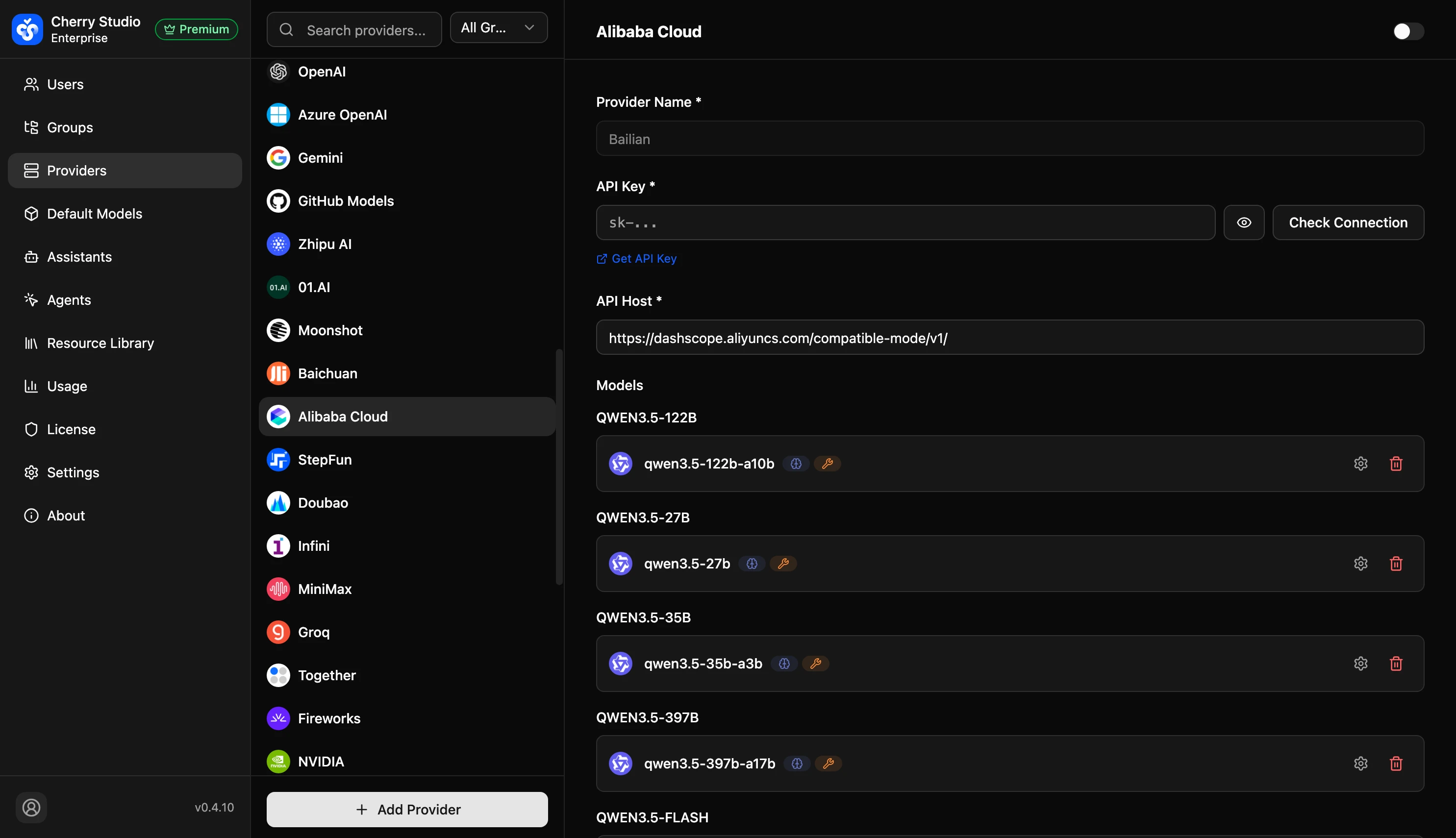
- Click the Aliyun Bailian card, then click the toggle in the upper-right corner to enable this provider.
- API Key: Enter the key from the Aliyun Bailian console (starts with
sk-). - API Host: Keep the default value.
- Address:
https://dashscope.aliyuncs.com/compatible-mode/v1
- Address:
- Click Check Connection to confirm "API Key valid".
- Click Save.
Model System Details
Based on Bailian's latest API policy, Cherry Studio groups models into two categories. Understanding the difference helps allocate resources by department.
A. Qwen (Commercial/Closed-Source)
At the top of the model list, representing Aliyun's strongest models.
| Series | Typical ID | Use cases | Recommendation |
|---|---|---|---|
| Flagship (Max) | qwen3-maxqwen3-max-2026-01-23 | Complex tasks. 262K context. Reasoning, long-form writing, instruction following. The current flagship commercial Qwen model. | ✅ Recommended for executives and core teams. |
| Balanced (Plus) | qwen3.6-plusqwen3.5-plus | Best value. 1M context. Faster than Max and lower cost, supports agentic workflows. | ✅ Recommended as a company-wide default. |
| Lightweight (Flash) | qwen3.5-flash | Ultra-low cost. 1M context. Ideal for simple Q&A, classification, and summarization. | 💡 Best for high-frequency, low-complexity tasks. |
| Reasoning (QwQ) | qwq-plus | Deep thinking. Optimized for math, code, and complex reasoning chains. | 🧠 Suitable for R&D or data teams. |
| Coder | qwen3-coder-plusqwen3-coder-flash | Code-focused. 1M context. Code generation, review, and refactoring. | 💻 Best for development teams. |
| Vision (VL) | qwen3-vl-plusqwen3-vl-flash | Image understanding. 262K context. Image recognition, OCR, chart analysis. | 👁️ Enable when image analysis is needed. |
| Long context (Long) | qwen-long | Massive document analysis. 10M context for full PDF summarization or Q&A. | 🔧 Use for extra-long document scenarios. |
About the Turbo series: qwen-turbo is no longer updated and has been replaced by qwen3.5-flash. If you are still using Turbo, consider migrating to Flash.
B. Qwen Open-Source Series (Hosted)
Aliyun Bailian hosts selected open-source models on enterprise GPU clusters, no local GPUs required.
| Series | Typical ID | Notes |
|---|---|---|
| Qwen 3.5 | qwen3.5-397b-a17bqwen3.5-27b | Current best open-source. 397B MoE architecture, Apache 2.0 license, performance approaching commercial models. |
| Qwen 3 | qwen3-235b-a22bqwen3-32bqwen3-8b | Main open-source generation. Parameters from 0.6B to 235B, supports thinking/non-thinking dual-mode switching. |
| Qwen 2.5 | qwen2.5-72b-instructqwen2.5-32b-instruct | Previous generation. Still available for existing deployment compatibility. |
| Qwen 2 / 1.5 | qwen2-72b-instructqwen1.5-110b-chat | Legacy versions. Backward compatibility support. |
About version suffixes (dates) You may see IDs like qwen3-max-2026-01-23.
- Best practice: Unless you depend on a specific date's behavior, use IDs without dates (e.g.,
qwen3-max,qwen3.6-plus). The system will point to the latest stable (latest).
Manage the Model List
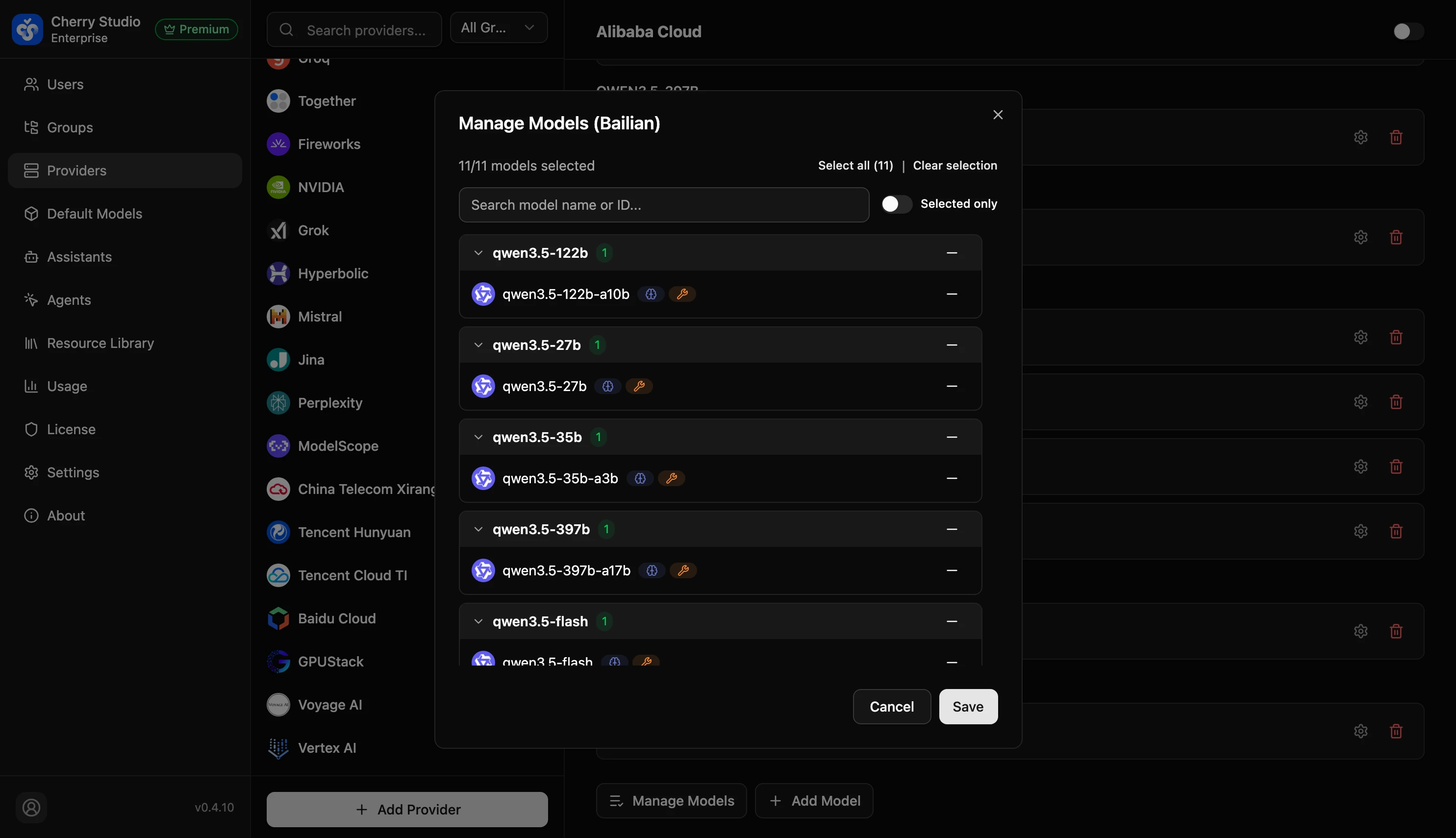
Bailian provides a long model list. To avoid overwhelming users, admins should trim it.
- Click 𝌡 Manage Models under the Bailian card.
- Suggested filtering:
- Keep
qwen3-maxandqwen3.6-plus(current flagship commercial models). - Keep
qwq-plus(for reasoning tasks). - Keep
qwen3-coder-plus(R&D focused). - Keep
qwen3.5-flash(lightweight high-frequency tasks). - Optionally keep
qwen3-32borqwen3-8b(open-source alternatives).
- Keep
- Hide redundancy: Click - to hide legacy models (e.g.,
qwen-max,qwen-plus), dated versions, or tiny models (0.5b,1.7b). - Click Save.
Add Other Providers (Custom)
Although Bailian is the default, Cherry Studio supports other channels.
Example scenarios:
- You want to integrate DeepSeek's official
deepseek-v4. - You want to integrate Zhipu GLM's
glm-5.2. - You run Ollama on a local server.
Steps:
- Click + Add Provider at the bottom of the list.
- Provider type:
- OpenAI (generic compatible protocol, works with most domestic models)
- Anthropic (Anthropic protocol)
- Ollama (local models)
- Fill in API Key and API Host.
- Example local Ollama host:
http://192.168.1.5:11434/v1
- Example local Ollama host:
- The provider's models will appear alongside Bailian models in the client model list.
FAQ
Q: What's the difference between qwen3-max and the legacy qwen-max?
A: qwen3-max is the current flagship model (262K context), while qwen-max points to the previous generation (Qwen 2.5-Max). It is still available but no longer the best choice. Use qwen3-max for new projects.
Q: What's the difference between qwq-32b and qwq-plus?
A: qwq-32b is an open-weight reasoning model, while qwq-plus is Aliyun's commercial closed-source reasoning model. The latter usually provides better reasoning and safety at higher cost.
Q: Can I still use qwen-turbo?
A: qwen-turbo is no longer updated. Migrate to qwen3.5-flash, which offers lower cost and longer context (1M).