Overview
The User Management main page is the console for maintaining the org structure. Here you can view real-time status of all registered users and quickly search or filter.
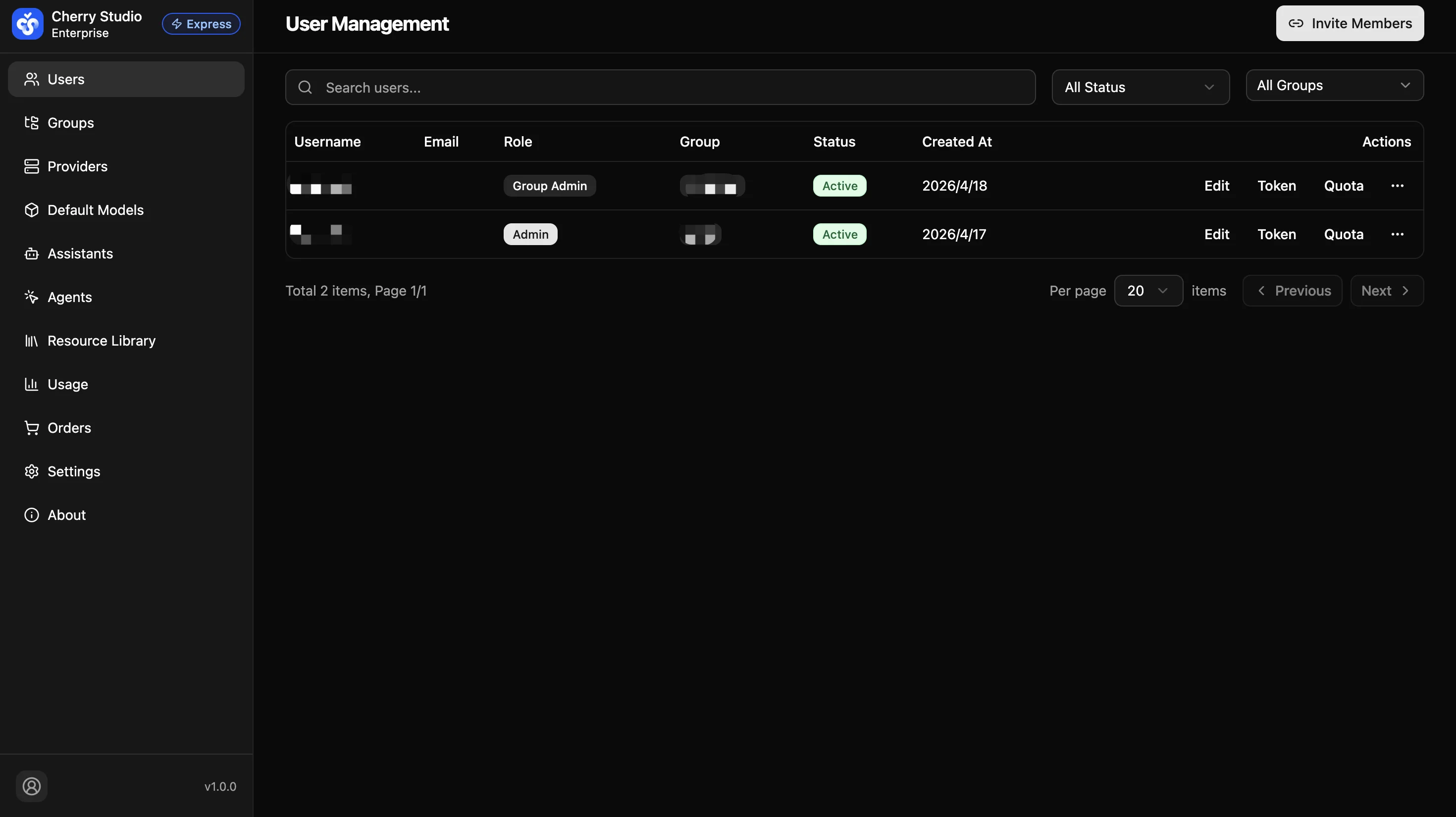
Core Areas
1. Global Search and Filters
The toolbar at the top provides efficient search:
- Search users: Fuzzy match by username to quickly locate employees.
- All statuses:
- Active: Accounts in normal use.
- Inactive: Disabled or not yet initialized accounts.
- All groups: Filter by user group (e.g., "Default", "Engineering") for department-based permission management.
2. User List Details
The table shows key identity info:
| Field | Description |
|---|---|
| Username | System login name and display name. |
| Unique contact identifier for notifications and password recovery. | |
| Role | Special permission label (e.g., Admin); empty for regular users. |
| Group | Bound permission group that determines accessible models. |
| Status | Active (green tag) or Inactive (gray tag). |
| Created at | Initial account registration timestamp. |
| Actions | Entry points for edit, key management, delete, etc. |
User Management
Centrally manage enterprise user accounts, permissions, and API credentials. Use groups to precisely control which AI models and assistant resources each department can access, balancing security compliance with cost management.
Member Invitation
Quickly add team members via invite links — invitees click the link to register and join the organization.